
FREE MCP SERVER PLUGIN FOR WORDPRESS

Turn WordPress into an MCP Server for Claude, ChatGPT & Any AI Agent

Your site becomes its own MCP server — one endpoint that Claude Code, Claude Desktop, ChatGPT, Cursor, VS Code and Windsurf can connect to and actually work with. Audit the site, read the error log, fix content, publish and moderate comments, with the tools and permission level you set per connection. No AI API keys. No SaaS middleman. No outbound calls, ever.

✔ Works with any MCP client ✔ Self-hosted, off by default ✔ Free on WordPress.org

New to MCP? Read the setup guide
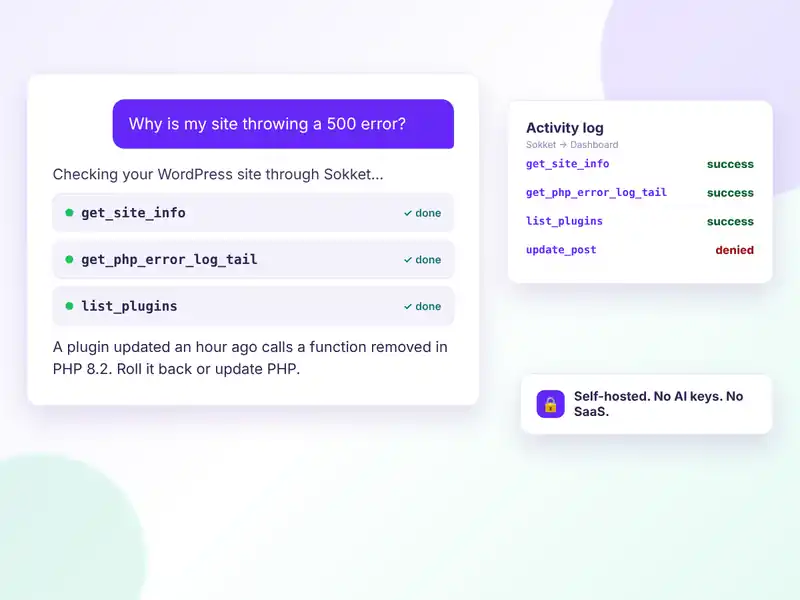
Sokket MCP server for WordPress connecting Claude, ChatGPT and Cursor to a WordPress site through one secure endpoint
FREE FEATURES

A complete, self-hosted MCP server — free

Sokket exposes one REST endpoint that speaks the Model Context Protocol. AI clients connect to your site; your site never connects to them.

One endpoint, every client

Streamable HTTP with JSON-RPC 2.0 at /wp-json/sokket/v1/mcp, protocol versions 2025-11-25, 2025-06-18 and 2025-03-26.

Setup generated for your site

Pick your client and copy the exact command or JSON config, endpoint already filled in.

OAuth 2.1 with PKCE

Clients configure themselves from the URL; users sign in, approve and choose read-only or full access.

Bearer tokens you control

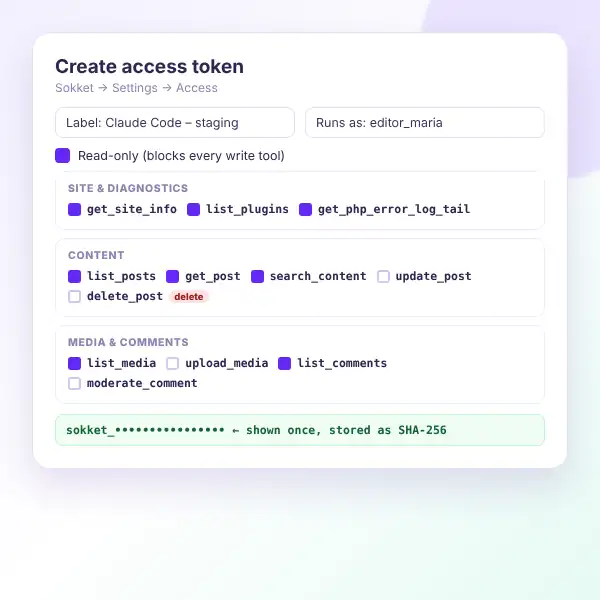
Bound to a WordPress user, stored as a SHA-256 hash, revoked in one click. Application Passwords work too.

46 built-in tools

Grouped by area and individually switchable per connection, plus integration tools.

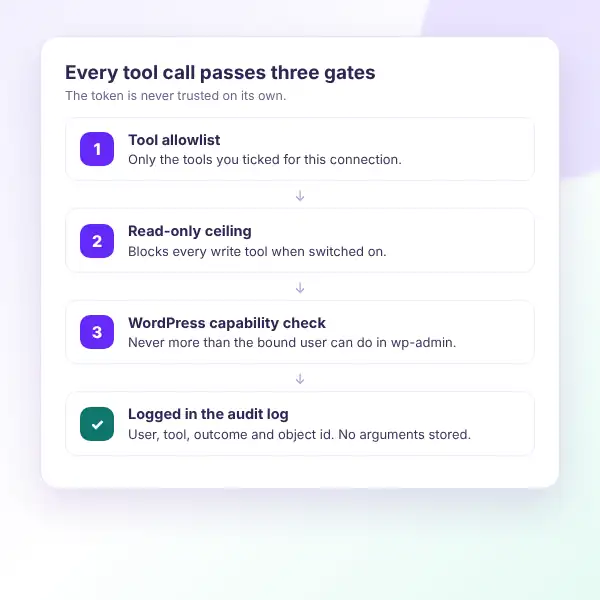
Three permission gates

Tool allowlist, read-only ceiling and a real current_user_can() check on every call.

Site design tools

Templates, global styles, Additional CSS, patterns and menus — every change revertible, no theme file touched.

WooCommerce integration

Variable products, variations, galleries and bulk stock, plus WooCommerce’s own product and order tools.

SEO & Image Generator

Meta descriptions and focus keywords via Yoast, Rank Math or SEOPress; on-brand images from your templates.

Any plugin’s abilities

Plugins that publish WordPress abilities appear automatically, with their own permission checks.

Logs & personal data protection

Every call logged without arguments; customer-data tools are never pre-ticked.

Outbound requests blocked

Integration calls run with every HTTP request refused, rate limited to 120 requests per minute.

HOW IT WORKS

Connect your AI client in five steps

Works with Claude Code, Claude Desktop, ChatGPT, Cursor, VS Code, Windsurf and other MCP clients.
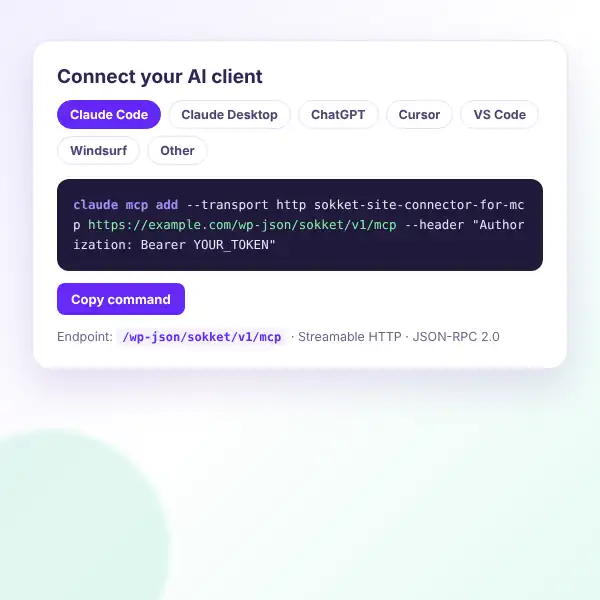
Sokket Connect your AI client screen with copy-ready setup commands for Claude, ChatGPT, Cursor and VS Code
Install and enable — switch the server on under Sokket → Settings → General. It ships disabled.
Choose how clients authenticate — a bearer token bound to a WordPress user, or OAuth 2.1 sign-in and approval.
Grant exactly what you want — tick the tools a connection may call and mark it read-only if you like. Write tools start off.
Connect your client — pick Claude Code, Claude Desktop, ChatGPT, Cursor, VS Code or Windsurf and copy the generated config.
Put the agent to work — audit the site, read the error log, fix a page, publish a draft or clear the comment queue.
Watch every call — each tool call lands in the logs with the user, connection, tool and outcome.

Need help? Follow the Getting Started guide or try the live demo.

WHAT YOU GAIN

Real results from the first connection

Every tool call passes three checks: the tool allowlist, the read-only setting and the WordPress capability of the connected user. If any check fails, the call is refused.
Diagnose, don’t guess

An agent that reads your site directly instead of guessing from a pasted screenshot.

Context, automatically

The PHP error log, plugin versions and environment in your agent’s context.

Your data stays home

This plugin makes zero outbound requests — your content stays on your server.

No subscription

No per-seat pricing or API markup — you already pay for your AI client.

Least privilege by default

Nothing is enabled until you enable it, and any connection can be revoked instantly.

A record of everything

Every action the agent took, logged in your own database.

Every Sokket tool call passes three gates: tool allowlist, read-only ceiling and WordPress capability check
Sokket Access settings: bearer tokens and a tool allowlist with read-only ceiling
WHY CHOOSE SOKKET

Built safe, by design

The MCP server is your WordPress install — no account to create, no AI vendor in the middle and a deliberately small attack surface.

100% self-hosted

No outbound calls to any AI vendor and no AI API key stored anywhere.

Standards done properly

OAuth 2.1 with PKCE, dynamic client registration and RFC 9728 / RFC 8414 discovery.

No risky tools

Deliberately no filesystem-write, database or shell tools — not in free, and not planned.

Safe media uploads

Uploads take base64 bytes, never a URL — no SSRF, SVG always refused.

Works with your plugins

WooCommerce, Yoast SEO, Rank Math, SEOPress, Image Generator and WordPress abilities.

Lightweight & extendable

Native admin, under 20KB of assets, and your own tools via sokket_register_tools.

REVIEWS

What users say about
Sokket

★★★★★

Game Changer for MCP server

I’ve connected the MCP server to ChatGPT and created a post for my site. It’s really easy to use. It also helps me to audit my site. I highly recommend this sokket plugin.


FAQ

Questions, answered

Do you have a question about Sokket? See the list below for our most frequently asked questions. If your question is not listed here, then don’t hesitate to get in touch with us.

GET STARTED

Give your AI agent a real connection

Stop pasting error logs into a chat window. Connect the agent to the site, decide exactly what it may touch, and let it work.

Start free

A self-hosted MCP server for WordPress, free on WordPress.org.

✔ OAuth 2.1 and bearer tokens
✔ 46 tools, write tools off by default
✔ WooCommerce, SEO & design tools
✔ Logs and personal-data protection
✔ Zero outbound requests

👀 Try the live demo first

See it in action 👀

Explore the Sokket admin on a live WordPress site before you install.

✔ Server settings
✔ Access tokens and allowlist
✔ OAuth connections
✔ Copy-ready client setup

Shopping Cart
  • Your cart is empty.