
FREE INVOICE PAYMENT GATEWAY FOR WOOCOMMERCE

Let Customers Order Now and Pay by Invoice

Invoice Payment adds a “Pay by Invoice” option to your WooCommerce checkout. Perfect for B2B buyers, trusted repeat customers and businesses that pay on invoice. You choose where it shows and what instructions customers see.

✔ Free on WordPress.org ✔ Block checkout ready ✔ HPOS compatible

Questions? Ask in the support forum
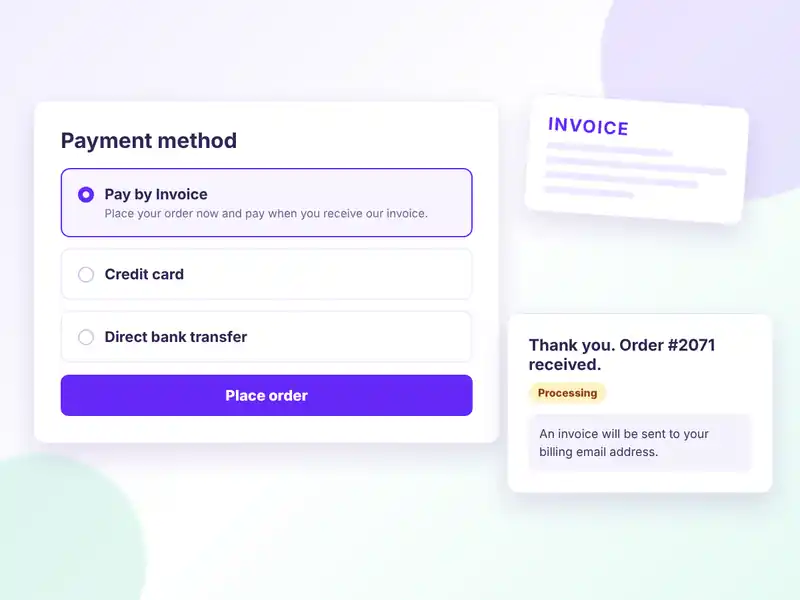
WooCommerce checkout with Pay by Invoice selected and a thank-you page showing invoice instructions
FREE FEATURES

A simple invoice gateway for WooCommerce

Accept orders without taking payment at checkout, then collect it on your terms.

Pay by Invoice at checkout

A new offline payment method customers can pick at checkout.

Custom title & description

Name the method and explain it in your own words.

Payment instructions

Shown on the thank-you page and in customer order emails.

Limit by shipping method

Offer it only with the shipping methods or zones you choose.

Virtual orders on or off

Decide if virtual or downloadable-only orders can use it.

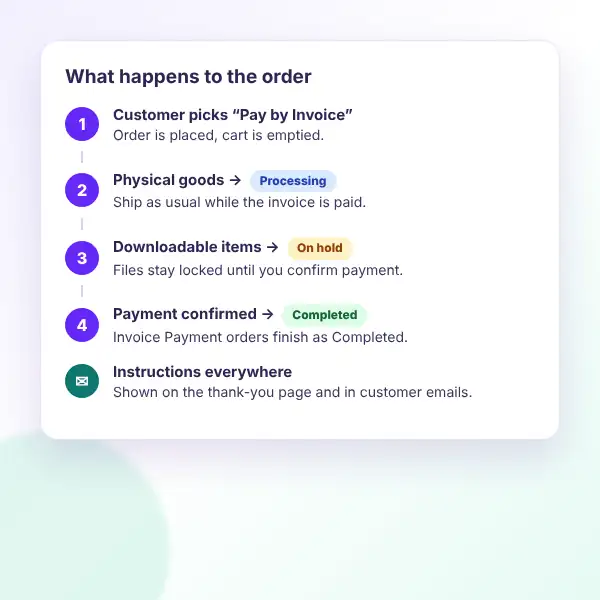
Smart order status

Physical orders go to Processing, downloads wait On hold.

Completes cleanly

Paid invoice orders move to Completed automatically.

Free orders handled

Zero-total orders are marked paid right away.

Block checkout ready

Works with the WooCommerce Checkout block and classic checkout.

HPOS compatible

Declared compatible with High-Performance Order Storage.

Pay-for-order pages

Availability rules also apply to existing order payment links.

Developer filters

Change the icon, shipping check or new order status with filters.

HOW IT WORKS

Set up invoice payments in two minutes

Everything lives in the standard WooCommerce payment settings.
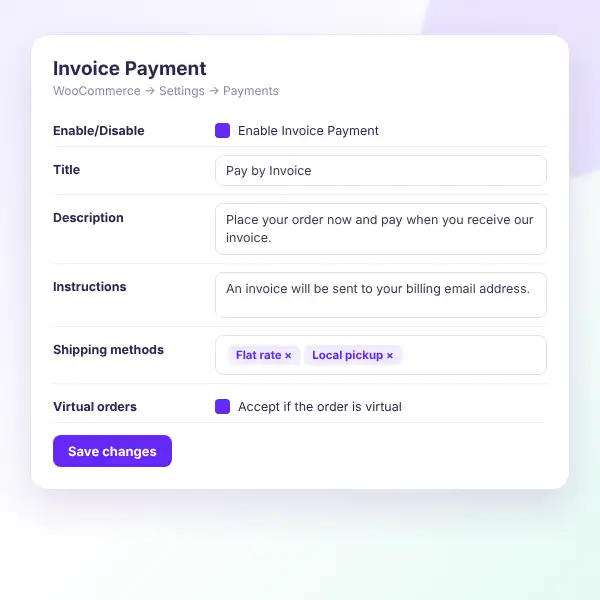
Invoice Payment gateway settings: enable, title, description, instructions, shipping methods and virtual orders
Install the free plugin — search for “Invoice Payment” under Plugins → Add New.
Open the payment settings — go to WooCommerce → Settings → Payments.
Enable Invoice Payment — switch it on and give it a clear title.
Write your instructions — e.g. “An invoice will be sent to your billing email.”
Pick shipping methods — or leave empty to allow every method.
Save and test — place an order and see your instructions on the thank-you page.

Want to see it first? Explore the live demo or ask in the support forum.

WHAT YOU GAIN

Sell to businesses the way they buy

Many companies can’t pay by card at checkout. Give them a familiar invoice option and keep the order moving.
Win B2B orders

Buyers order now and pay on terms.

Fewer abandoned carts

No card needed to place the order.

Clear next steps

Instructions on the thank-you page and emails.

Safe for downloads

Downloadable orders wait On hold.

Right customers only

Limit it by shipping method.

Works with your tools

Send invoices from the system you already use.

Invoice Payment order flow: processing for physical goods, on hold for downloadable items, completed after payment
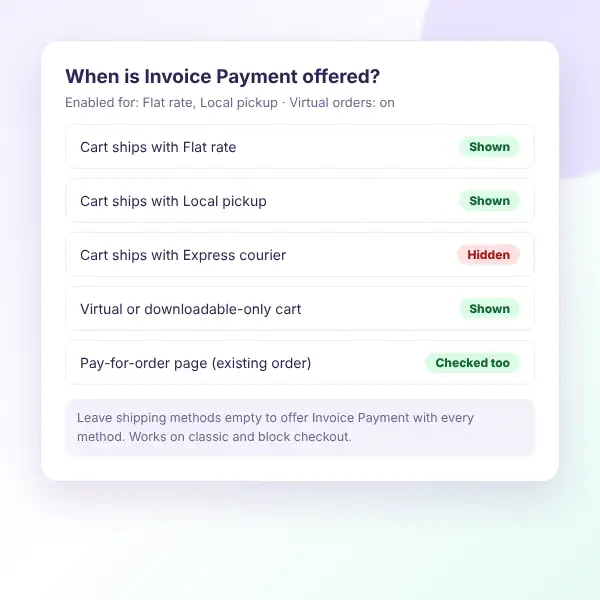
Invoice Payment shown or hidden at checkout based on selected shipping methods and virtual orders
AVAILABILITY RULES

Show it only where it makes sense

Invoice Payment checks the cart before showing at checkout, so only the right orders can use it.

Shipping methods

Allow any method type or specific zone instances.

All methods

Leave the list empty to allow every method.

Virtual orders

Turn invoice payment on or off for virtual carts.

Existing orders

Pay-for-order pages follow the same rules.

Block checkout

Shown in the Checkout block as a payment method.

Filters

invoice_payment_cart_needs_shipping and more.

FAQ

Questions, answered

Do you have a question about Invoice Payment? See the list below for our most frequently asked questions. If your question is not listed here, then don’t hesitate to get in touch with us.

GET STARTED

Start accepting invoice orders

Give business customers the payment option they expect. Install Invoice Payment for free and add “Pay by Invoice” to your checkout today.

Start free

An invoice payment gateway for WooCommerce, free on WordPress.org.

✔ Pay by Invoice at checkout
✔ Custom instructions in emails
✔ Limit by shipping method
✔ Smart order statuses
✔ HPOS & Checkout Blocks ready

👀 Try the live demo first

See it in action 👀

Place a test order on a live WooCommerce store with Invoice Payment set up.

✔ The checkout option
✔ Thank-you page instructions
✔ Gateway settings
✔ Order status flow

Shopping Cart
  • Your cart is empty.