
FREE FORM BUILDER FOR THE BLOCK EDITOR

Build WordPress Forms with Native Blocks

Forming Forms turns every form into a block. Add the Form block to any page, drag in the fields you need and publish. No shortcodes, no separate builder screen. Spam protection, email notifications and saved entries are built in.

✔ Free on WordPress.org ✔ No shortcodes ✔ No jQuery, no CAPTCHA

Questions? Ask in the support forum

Forming Forms in the WordPress block editor: field blocks in the inserter, a contact form on the canvas and Form settings in the sidebar
FREE FEATURES

Everything a contact form needs, built on blocks

Build forms the same way you build the rest of your page, with the editor you already know.

A form is a block

Add the Form block to posts, pages, templates, template parts or widgets.

12 field blocks

Text, email, textarea, number, phone, URL, select, radio, checkbox, date, hidden and submit.

No shortcodes

What you arrange in the editor is exactly what visitors see.

Server-side validation

The server rebuilds the form from the page and checks every submission.

Spam protection, no CAPTCHA

A honeypot and a time-trap, both on by default.

Email notifications

Multiple recipients, custom subject, From name and Reply-To.

Saved entries

Submissions are stored in your own WordPress database.

Native block styling

Spacing, typography, color and borders from core block controls.

Field width presets

Place fields side by side without writing CSS.

Message or redirect

Show a thank-you message or send visitors to any URL.

Accessible markup

Real labels, fieldsets, help text and a live region for messages.

Lightweight

No jQuery, no external service. Assets load only where a form exists.

HOW IT WORKS

Build your first form in under a minute

The Form block starts as a working contact form, so you can publish right away.
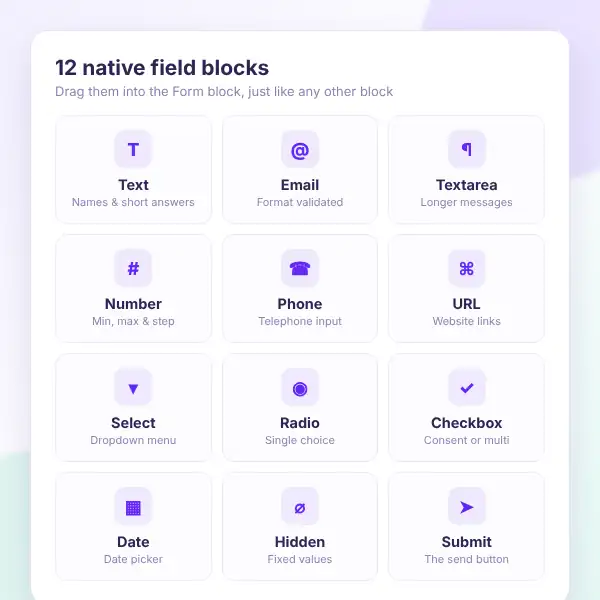
The 12 Forming Forms field blocks: text, email, textarea, number, phone, URL, select, radio, checkbox, date, hidden and submit
Install Forming Forms — search for “Forming Forms” under Plugins → Add New and activate it.
Add the Form block — it starts with Name, Email, Message and a Send button.
Drag in more fields — each has a label, placeholder, help text, required toggle and width.
Set notifications — add recipients and a subject in the block sidebar.
Choose what happens next — a thank-you message or a redirect to any page.
Publish — reuse the form anywhere by saving it as a synced pattern.

Want to try it first? Open the live demo or ask in the support forum.

WHAT YOU GAIN

Stop spam and forged submissions

Every submission is checked on your server. The browser’s field list is never trusted, so a tampered form cannot add fields or skip a required one.

Honeypot field

Hidden from people, caught for bots.

Time-trap

Blocks forms sent too fast.

No CAPTCHA

Visitors never solve a puzzle.

Schema rebuilt

Fields read again from the page.

Unknown fields dropped

Only fields you built are saved.

Security nonce

Requests without one are refused.

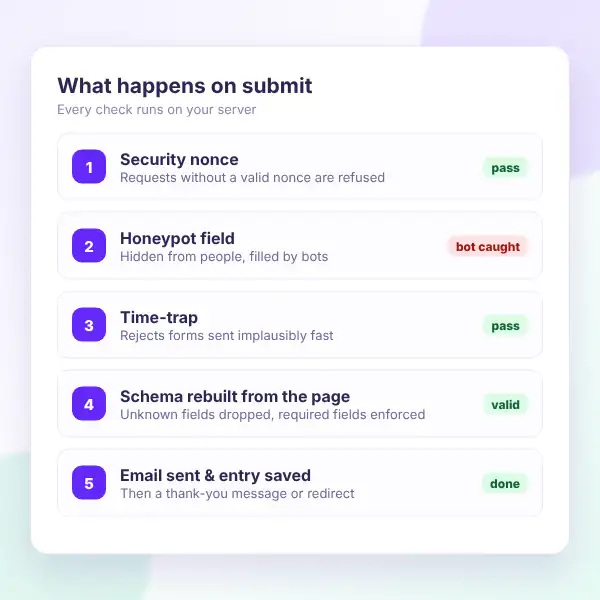
What happens when a Forming Forms form is submitted: nonce check, honeypot, time-trap, server-side validation, then email and saved entry
Forming Forms email notification with custom From address, multiple recipients and Reply-To set to the visitor email
NOTIFICATIONS & ENTRIES

Every message lands where you need it

Get each submission by email and keep a copy in your own database. Reply straight from your inbox.

Multiple recipients

Send to one or more addresses.

Custom subject & sender

Set the subject, From name and address.

Reply-To visitor

Hit reply to answer the visitor.

Works with SMTP

Sent with wp_mail() and your SMTP plugin.

Saved entries

Stored in your own WordPress database.

Developer hooks

forming_submission_saved and more.

REVIEWS

What users say about
Forming Forms

★★★★★

Forming Forms is truly a beautiful plugin.

The concept is brilliant: a form is a block, and all form fields are blocks within that form block. It is ideal for anyone wanting to move away from the WordPress legacy plugins and work exclusively with the block editor and FSE — and be ready for the future. Support is fast and effective.


FAQ

Questions, answered

Do you have a question about Forming Forms? See the list below for our most frequently asked questions. If your question is not listed here, then don’t hesitate to get in touch with us.

GET STARTED

Build your form where it belongs

Stop pasting shortcodes into pages. Add a block, drag in your fields and publish. Forming Forms is free on WordPress.org.

Start free

A block-native form builder, free on WordPress.org.

✔ 12 native field blocks
✔ Spam protection without CAPTCHA
✔ Email notifications & saved entries
✔ Server-side validation
✔ No jQuery, no shortcodes

👀 Try the live demo first

See it in action 👀

Fill in a real form and see the block editor setup on our live demo site.

✔ Contact form in action
✔ Field blocks in the editor
✔ Form settings sidebar
✔ Thank-you message

Shopping Cart
  • Your cart is empty.