
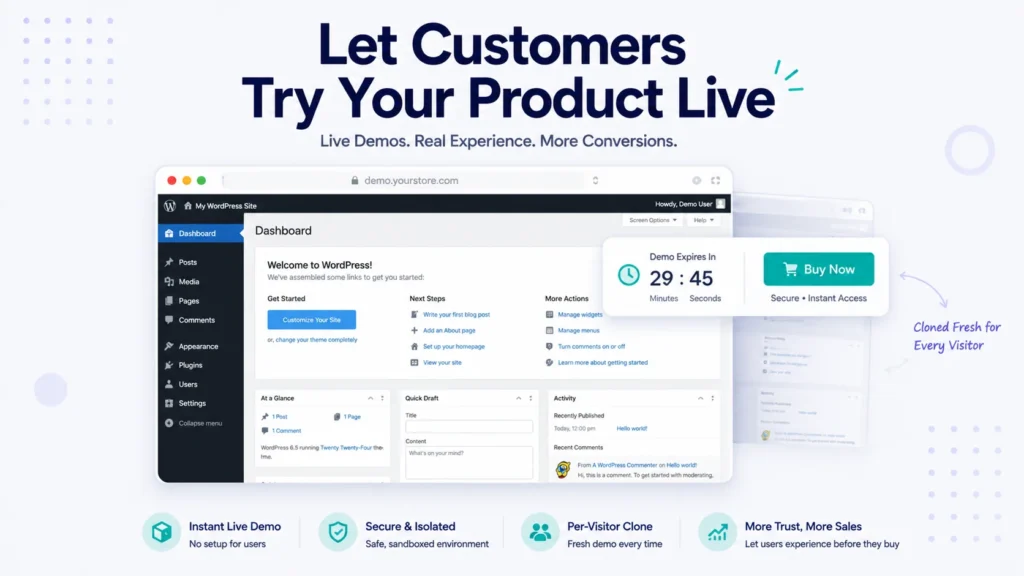
If you sell a WordPress plugin or theme, you already know where deals stall. A prospect is interested, they’ve read your feature list, they’ve looked at your screenshots, and then they hesitate. They want to know one thing screenshots can’t tell them: what it’s actually like to use.
Screenshots and feature lists describe your product. A live demo lets people experience it. And that gap is often the difference between a visitor and a customer. The trouble is that offering a real, hands-on demo is genuinely hard to do well. A single shared demo site gets messed up by whoever touched it last; there’s no isolation between visitors, no way to capture who tried it, and someone has to keep cleaning it up.
In this guide, we’ll show you how to offer a proper self-service live demo for your WordPress product, where every visitor gets their own private sandbox, using TryDemo – Demo Builder for WordPress.
Why Live Demos Convert Better
For products people buy based on how they feel to use, hands-on beats everything:
- Trying reduces risk. Letting someone click around removes the “will this actually work for me?” doubt that kills sales.
- It qualifies buyers. People who take a demo are further along than people who just skim a page, so the leads are warmer.
- It shows, instead of tells. Your best features often only land when someone experiences them, not when they read a bullet point.
- It builds trust. Offering an open, no-strings demo signals confidence in your product.
The challenge has always been offering that experience safely and without babysitting it. That’s the problem TryDemo solves.
The Problem With DIY Demo Sites
Most product sellers who try to build their own demo run into the same wall. A shared demo site means every visitor sees the last person’s changes, including any mess or abuse. Give demo users real access and they can wander into places they shouldn’t, change settings, or break things for everyone after them. And keeping it clean means either constant manual resets or a fragile pile of scripts. On top of all that, you usually have no idea who tried your demo, so a warm lead just clicks away and disappears.
A purpose-built demo platform handles all of that for you.
What TryDemo Does
TryDemo turns your WordPress multisite network into a self-service demo machine. When a visitor asks to try your product, it spins up a private, fully working site just for them, cloned from your template and pre-loaded with your plugin or theme, and logs them in as admin in seconds. When their time is up, it cleans up after itself automatically.
Here’s how the key pieces work.
A Private Sandbox for Every Visitor
Each visitor gets their own cloned demo site, created on demand and logged in as admin. No shared site, no other people’s clutter, no collisions. They get to explore your product as if it were their own installation.
Clone Any Template on Your Network
Sandboxes are spun up from a template site using its source_id, so you can offer demos of different products, plans, or configurations, each from its own template.
It Cleans Up After Itself
An hourly cleanup job automatically purges expired sandboxes, so your network stays lean without any manual housekeeping. Need a permanent demo for a key prospect or a marketplace listing? Mark a sandbox as lifetime and the cleanup skips it.
Safe by Default
Demo users get real admin access, but only where you allow it. You can restrict specific admin pages to keep visitors inside the sandbox, hide the Plugins menu, and block demo users from changing passwords or emails so a sandbox can’t be hijacked. reCAPTCHA and an option to disable new registrations keep bots and abuse out of your demo funnel.
Turns Demos Into Leads
This is what makes TryDemo a sales tool and not just a convenience. Every demo request captures a lead with their email, so “just looking” becomes a contact you can follow up with. You can send branded welcome emails containing the demo login details using {login} and {password} placeholders, and push every demo requester straight into a Mailchimp audience for automated nurture campaigns.
Nudges Toward Purchase
Inside every demo, you can show a customizable front-end toolbar with a live countdown, a call-to-action, and your purchase link, so the path from “trying it” to “buying it” is always one click away while the experience is fresh.
Drop-In Buttons and Reports
Add a “Try Demo” button anywhere on your site using Gutenberg blocks, shortcodes, or classic widgets, as an inline button or a popup. A network Reports screen shows how many sandboxes were created, activated, and expired, so you can measure demo interest.
Setting It Up (The Short Version)
TryDemo runs on a WordPress multisite network, since that’s what lets it clone sites per visitor. In broad strokes, you set up a template site with your product installed and configured the way you want prospects to see it, install and configure TryDemo (pointing it at your template, setting sandbox expiry, guardrails, and lead capture), then drop a “Try Demo” button onto your sales pages. From there, the whole flow runs itself.
Who TryDemo Is For
TryDemo is built for anyone selling a WordPress product through hands-on experience: plugin developers who want prospects to feel the plugin before buying, theme shops that want visitors to click through a live theme, and agencies or product teams that want a professional, self-service demo without maintaining fragile shared sites.
Pricing
TryDemo is a premium product, with plans starting at $29 per year or $59 for a lifetime license, each including unlimited demo sandboxes and Mailchimp integration. Every plan includes a 14-day money-back guarantee, and with the current WELCOME50 code, you can get 50% off. (It does require a WordPress multisite network, which is what makes the per-visitor sandboxes possible.)
Frequently Asked Questions
Yes. TryDemo works on a WordPress multisite network, because that’s what allows it to clone a fresh, isolated demo site for each visitor. The multisite requirement is what makes the private-sandbox model possible.
An hourly cleanup job removes expired sandboxes automatically, so your network stays clean with no manual work. You can also mark specific sandboxes as lifetime so they’re never purged.
Yes. Every demo request captures the visitor’s email as a lead, can trigger a branded welcome email with login details, and can sync the contact into a Mailchimp audience for follow-up.
Yes. You control exactly what demo users can reach. You can restrict admin pages, hide the Plugins menu, and block password and email changes, and reCAPTCHA plus a registration toggle keep bots out.
You add a “Try Demo” button to your site with a block, shortcode, or widget, as an inline button or a popup. Clicking it spins up their personal sandbox and logs them in.
Ship More Trials This Quarter
If your product sells itself once people actually use it, the smartest thing you can do is let them. TryDemo turns your multisite into a self-service demo platform that creates a private sandbox for every visitor, captures the lead, nudges toward purchase, and cleans up on its own.
Explore TryDemo and turn your visitors into hands-on prospects.