
FREE SHORTCODE MANAGER PLUGIN FOR WORDPRESS

Write It Once. Reuse It Everywhere.

Create reusable content blocks for notices, offers, contact details or calls to action, then drop them anywhere with one shortcode. Edit the block once and every page updates.

✔ Free on WordPress.org ✔ One shortcode per block ✔ No coding needed

Questions? Ask in the support forum
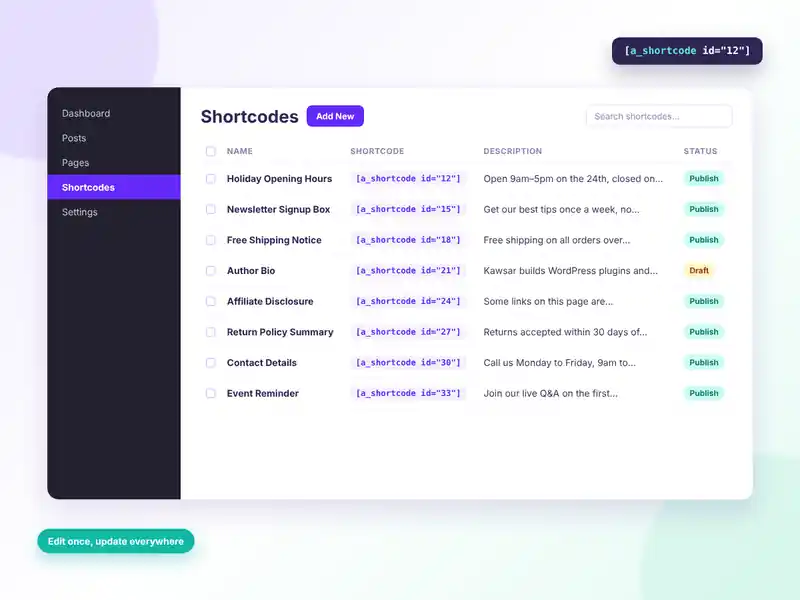
Shortcodes plugin admin list of reusable shortcode blocks with name, shortcode, description and status
FREE FEATURES

A simple home for your reusable content

Stop copying the same text into ten pages. Keep it in one place and let a shortcode do the rest.

Reusable content blocks

Save text, links, images and formatting as named blocks you can reuse.

One shortcode each

Every block gets its own shortcode, like [a_shortcode id=”12″].

Copy with one click

The shortcode sits right on the edit screen, ready to copy.

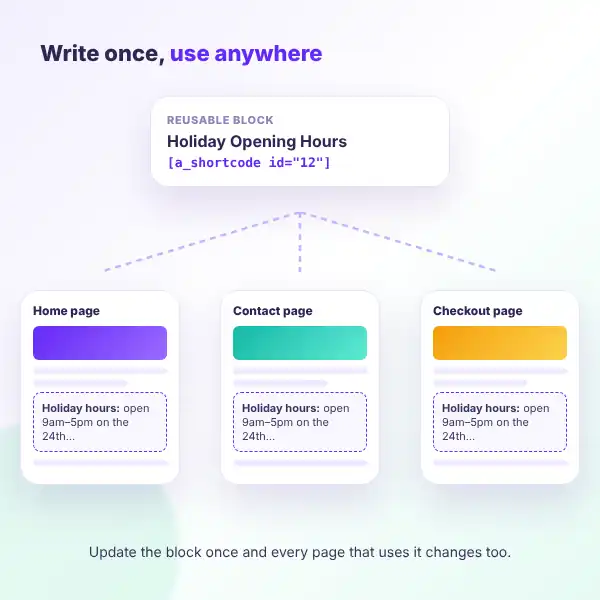
Edit once, update everywhere

Change a block and every page that uses it changes too.

Built-in editor

Write content with the familiar WordPress editor and media button.

Draft and pending status

Only published blocks show on your site, so drafts stay hidden.

Optional sub title

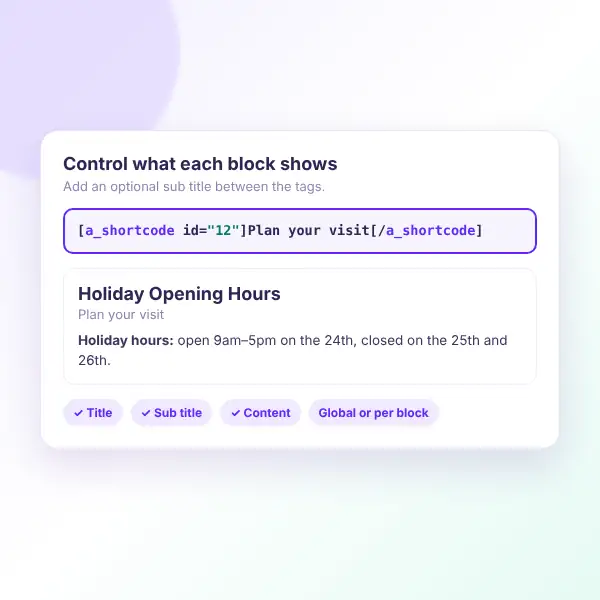
Wrap text in the shortcode to add a sub title to that one placement.

Show or hide parts

Turn the title, sub title or content on or off for each block.

Site-wide defaults

Set the default display options once in Settings.

Search and sort

Find blocks fast and sort the list by name or status.

Bulk delete

Clean up old blocks in one step from the list.

Safe output

Content is filtered with WordPress’ own safe HTML rules.

HOW IT WORKS

Your first reusable block in two minutes

Create it, copy the shortcode, paste it where you need it.
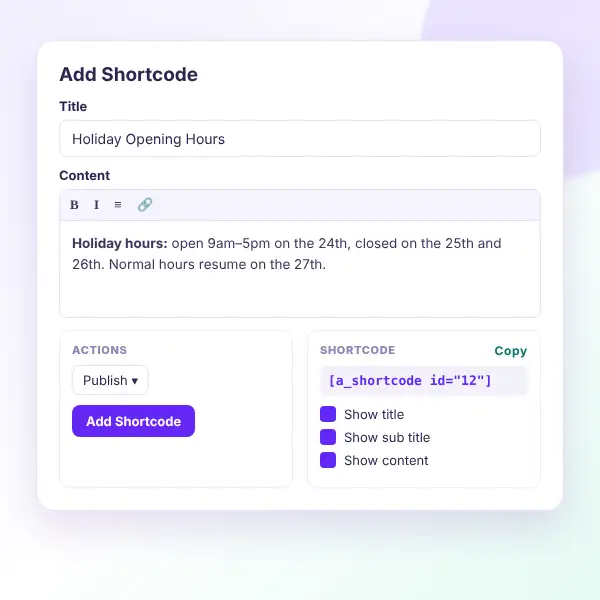
Add Shortcode screen with title, content editor, status and a copyable shortcode
Install the free plugin — search for “Shortcodes” by BeautifulPlugins under Plugins → Add New.
Add a new shortcode — give it a clear name, like “Holiday notice”.
Write the content — use the editor to add text, links and images.
Publish it — only published shortcodes render on the front end.
Copy the shortcode — it appears on the edit screen, e.g. [a_shortcode id=”12″].
Paste it anywhere — pages, posts or any area that runs shortcodes.

Want to see it first? Explore the live demo or ask in the support forum.

WHAT YOU GAIN

Save time on every update

Opening hours changed? New offer this week? Update one block instead of hunting through every page.
No more copy and paste

Write shared content one time.

Consistent everywhere

The same wording on every page.

Faster updates

One edit changes every placement.

Fewer mistakes

No forgotten pages with old details.

Easy for clients

Non-technical editors can update blocks.

Tidy library

All blocks listed, searchable and sortable.

One reusable shortcode block used on Home, Contact and Checkout pages
Shortcodes display options: show or hide title, sub title and content
DISPLAY OPTIONS

Control what each block shows

Set site-wide defaults in Settings, then fine-tune any single block on its edit screen.

Show title

Display the block name above its content.

Show sub title

Display text wrapped inside the shortcode.

Show content

Display the main block content.

Per-block settings

Override the defaults for one block.

Basic usage

[a_shortcode id=”12″]

With a sub title

[a_shortcode id=”12″]Today only[/a_shortcode]

FAQ

Questions, answered

Do you have a question about Shortcodes? See the list below for our most frequently asked questions. If your question is not listed here, then don’t hesitate to get in touch with us.

GET STARTED

Write once, reuse everywhere

Stop updating the same text on every page. Install Shortcodes for free, create a block, and paste one shortcode wherever you need it.

Start free

A simple reusable content manager, free on WordPress.org.

✔ Unlimited reusable blocks
✔ One shortcode per block
✔ Edit once, update everywhere
✔ Title, sub title & content toggles
✔ Search, sort & bulk delete

👀 Try the live demo first

See it in action 👀

Explore a live WordPress site with Shortcodes already set up.

✔ Real reusable blocks
✔ Shortcodes on live pages
✔ Sub title examples
✔ Display options in use

Shopping Cart
  • Your cart is empty.